
How to Make MIDI Drums Sound Real
Practical drum programming tips on accents, micro timing, and groove.
September 16th, 2026
Programmed drums often sound robotic not because anything's technically wrong, but because they lack the small human details that create groove. The article walks through five fixes, in order of priority, using UJAM Virtual Drummer NEON as the example tool.
Article Summary:
- Accents first, timing second — vary velocity between quarter-notes and off-beats before quantizing
- Virtual Drummer — use virtual instrument plugins whose patterns already fits
- Groove against the bass — use timing settings to test the feel; not every part needs moving
- Break loop monotony — 1–2 targeted changes per 8 bars beats repeating the same ending
- Shorten decay for clarity — tighter hi-hat/kick envelopes separate drums from bass without moving notes
You’ve picked a drum kit you like…
The kick works with the bass, and the snare sounds good in the mix…
Then you let the loop run for a minute and realize how repetitive it feels, and even if nothing is technically wrong, the pocket where your drums are playing in is an uncanny valley wide enough to be tagged as especially annoying and incredibly, pardon the French, whack.
Programmed drums often sound overly robotic because the performance repeats itself without much musical intention, and it does do directly on the grid that your DAW loves oh so much to force down your throat. All this, coupled with other small details that make all the difference that most producers don’t know or forget to give proper TLC, and you have a robotic and rigid drum track that tears down paradise and grooves like a parking lot.
UJAM Virtual Drummer NEON gives you a few ways to address that, whether you want to program individual hits or start with its recorded performances, and the part worth spending time on is those exact aforementioned details that make all the difference: what should change and why.
Start With Accents You Can Actually Hear
A human drummer doesn’t hit each note with equal force, and there’s usually a repeatable pattern to the emphasis, and that pattern contributes to the groove, creates important anchor points for people to dance to, but provides enough variation for details and movement within individual bars and across the wider loop.
Listen to how the loop pictured below sounds in the audio example below it… Very boring and robotic
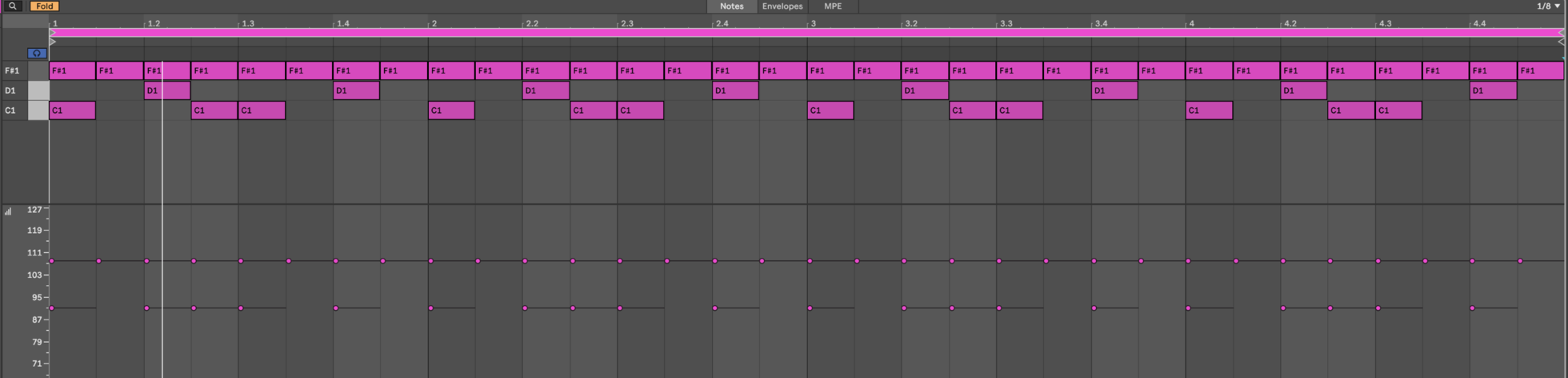
Try this with a simple eighth-note closed-hat part: keep the quarter-note counts softer and accent the notes between them. MIDI velocities of 65 and 95 are reasonable starting points. Play that against a steady kick, then reverse the emphasis and listen again.
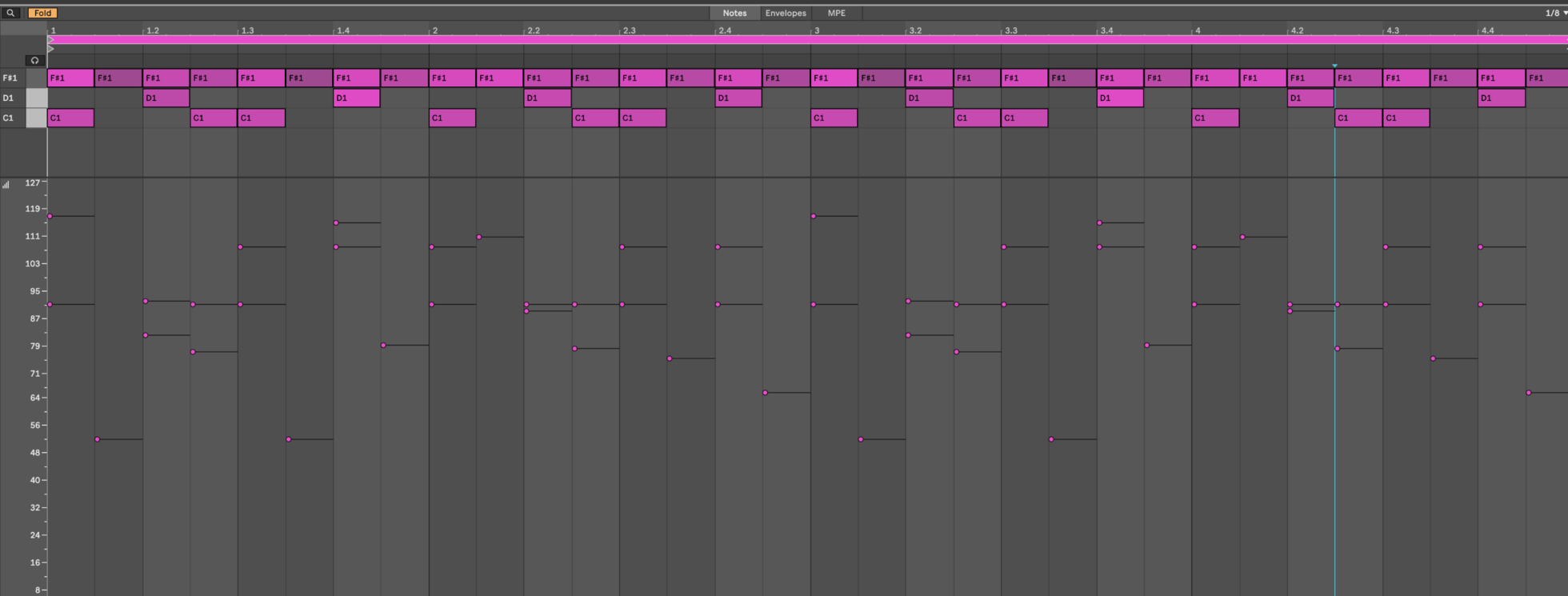
The note positions haven’t changed, yet the rhythm should feel different.
That’s why I’d sort out accents before reaching for timing randomization. You can get plenty of movement from notes that remain exactly on the grid.
Once the basic accent pattern works, introduce smaller differences between repeated notes. A few velocity steps may be enough. Huge changes can make the drummer sound distracted, which probably wasn’t the brief.
If you’re starting with one of NEON’s performed phrases, listen specifically to the hat accents. Choose a phrase whose emphasis suits the track before adding percussion to compensate for a rhythm you don’t particularly like. Below are preset loops from the Welcome To The Party kit, and you’ll notice how the accents of the quarter-note hats create their own story within the loop that keeps things moving forward.
Get the Bass Involved Before Adjusting Timing
Drums can sound convincing alone but get super awkward once the bass comes in, and the alchemical relationship between those layers deserves all the time it takes to get right before you spend your whole afternoon moving individual notes.
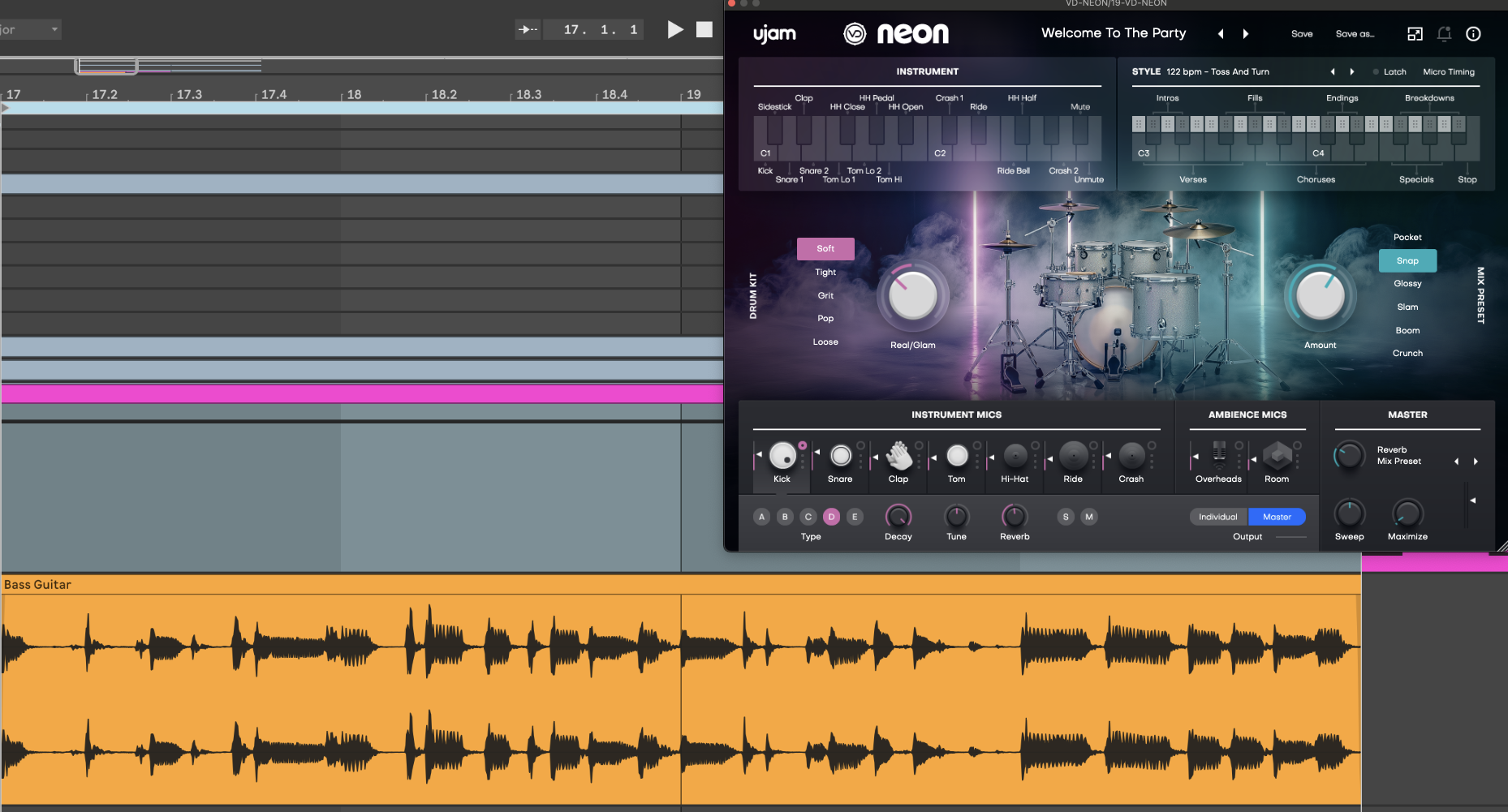
NEON’s Micro Timing controls let you explore that relationship. Loop a short section with the bass playing and make a small adjustment toward Push or Pull. Compare it with the original position at the same listening level.

Listen for the starts of the bass notes. Does the drum performance feel slightly ahead of them? Does a timing adjustment make the phrase feel more relaxed, or does it create an audible disagreement?
You're not obligated to move anything (it’s your world). A tightly quantized kick can suit dance music perfectly well while the percussion supplies looser timing.
For manually programmed parts, you could leave the kick where it is and experiment with moving selected hats a few milliseconds later in your DAW. Try five milliseconds as a starting point, then compare. The right amount depends on the tempo and the sounds.
I’d make that decision with the full rhythm playing. Soloing a hi-hat for twenty minutes offers plenty of opportunities to develop opinions nobody listening to the song will share.
Stop Giving Each Bar the Same Ending
An open hat at the end of a loop might sound good. Hearing it in exactly the same place for the next four minutes can make it feel automatic.
Duplicate your pattern into an eight-bar phrase and make just two changes. Add a brief hat variation in bar four, then remove a kick before a short tom fill in bar eight. Listen to the complete phrase before editing anything else.
Now those changes have different jobs. The first adds interest within the section. The second helps announce the next section.
NEON’s phrase system gives you another way to do this and with the Latch enabled, its white-key phrases handle repeating parts, while black-key phrases provide temporary changes. You can also audition busier variations within the Verse or Chorus ranges as the song develops, so check out the audio loop below to hear two ways to turn around a loop's cycle just from the phrasing built into the Welcome To The Party kit.
Check the Space After Each Hit
We tend to think about groove in terms of when notes start. How long they last also affects the rhythm. Just to remind us all where we’re at, below is the audio of the loop we’ve been toying with before any additional tweaking to the envelopes of the sample.
Take a closed hi-hat playing steady sixteenths. If its decay extends into the following hit, the pattern can sound almost continuous. Shortening the decay creates more audible gaps, which can make the same MIDI part feel more defined.

Choose those changes against the arrangement. If a vocal phrase continues across the transition, a busy fill could compete. A brief dropout might work better.
A fill button doesn't create a contractual obligation to press it, but we all know it sounds smooth and sexy.
That’s a good reason to check envelopes before rewriting a pattern.
Sometimes the notes are already in the right places, and it’s just a couple of little points of detail that need the lovin’ you never knew you needed to give (no, there’s a lesson for life that we won’t charge ya for)
Stay up to date
Sign up and we’ll send you an e-mail with product news and helpful stuff every now and then. You may unsubscribe at any time.
Defy Limits
We develop software solutions that enable people to create, consume and interact with music.
About UJAM
UJAM is a German-American maker of music technology co-founded by Hans Zimmer and Pharrell Williams that develops Virtual Instrument and Effects Plug-ins. With the Plug-in series Virtual Pianist, Usynth, Groovemate, Symphonic Elements, Virtual Guitarist, Virtual Bassist, Virtual Drummer, Beatmaker and Finisher and a range of software solutions (desktop, mobile, web), UJAM helps people to make music.